



We’re improving the Phoenix Health App and Online Member Services (OMS) to better protect your personal data and privacy. From the 22nd of June 2026, we’re introducing individual logins and mandatory Multi-Factor-Authentication to ensure that your user experience is better and safer.
Key Points
- From 22 June 2026 mandatory Multi-Factor Authentication (MFA) will be implemented across Online Member Services and the Phoenix Health App.
- Members will need to re-register for OMS and the App on or after 22 June 2026, using their email address, regardless of whether they have registered previously or not.
- Individual log ins will be available for each member listed on a policy over the age of 16.
- Each individual log in requires a unique email address, so if a member is listed on or manages more than one membership, a unique email address must be used for each log in.
Why are we making these changes to OMS and the App?
We’re really focused on the security of our members data; multi-factor authentication allows us to add an extra layer of security to your personal information.
What do these changes mean for you?
The way you log into the Phoenix Health App and Online Member Services will look a little different… you’ll now use your email address and a Multi-Factor-Authentication (MFA) code to log in each time you log in.
How do I re-register for OMS and the Phoenix Health App?
When these changes come into place on 22 June 2026, even if you’ve registered for OMS or the App before, you’ll need to re-register your details. There will be a couple of additional steps you’ll need to take to set you up, but it will take less than a couple of minutes! Here’s how you can re-register…
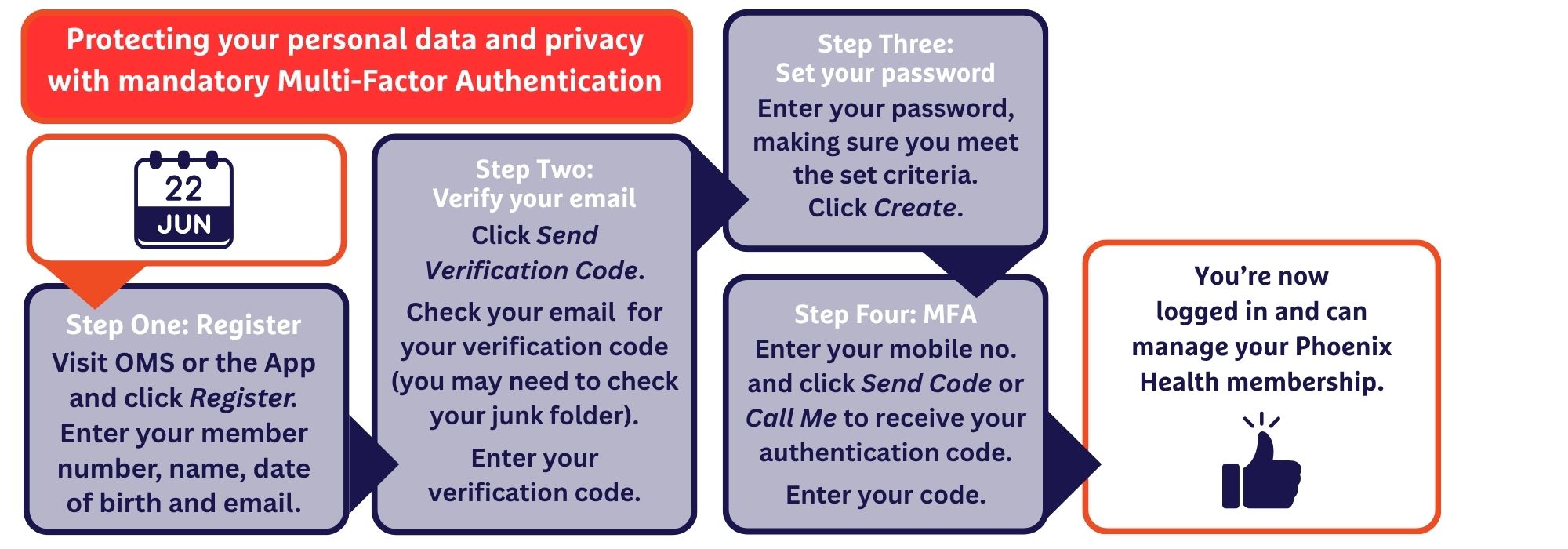
After you’ve completed the initial registration process, each time you log into the App or OMS, you’ll just be asked to enter your email address and password and you’ll be sent an authentication code to complete the new log in process.
I’ve already registered for OMS and the App and am currently using them. Do I have to re-register?
Yes. Because of the changes we’re making, to improve the security of your personal information, every member will need to re-register for both OMS and the App on or after 22 June 2026; even if they currently use either of these systems.
What happens if I don’t re-register for OMS and the App?
You won’t be able to log in to OMS and the App on or after 22 June 2026, until you’ve re-registered your details, including using Multi-Factor Authentication.
Not only does this mean that you won’t be able to manage your membership and submit claims using OMS and the App, you also won’t be able to access your Digital Member Card for claiming.
Can we only have one log in per membership?
For members on a Couple, Family or Single Parent Family policy, previously, only one log in per membership was available; using the details of the policy holder.
From 22 June 2026, we’re introducing individual logins; each member over the age of 16 on a membership will have access to their own App and OMS profile. This means that each member will be able to manage their own information, including submitting their own claims – and when they nominate a bank account in their profile, benefits will be able to be paid directly to them, rather than to the one account listed on the membership.
The policyholder will still be able to submit claims on behalf of anyone on their membership and nominate to have the benefits paid into their bank account on file.
I manage more than one Phoenix Health membership… how will this work?
Whether you are listed on more than one Phoenix Health membership, or you manage a family member’s policy on their behalf, you can still continue to do so, however you will need to re-register for OMS and the App for each membership with the new MFA requirements.
Please note though, that each Phoenix Health App and OMS profile needs a unique email address registered; you cannot use the same email address for more than one profile. So, if you share an email address with someone else, or you manage more than one Phoenix Health App or OMS profile, you will need to use a unique email address for each profile.

 Ben Thomas

 Tori Ingham
 Sharon Waterhouse